
LIST SYNC FOR SHAREPOINT ONLINE
GAIN AGILITY WITH
REAL-TIME REPORTING
Gain immediate access to all of your SharePoint lists in one place. With data collated and stored in SQL, you’ll be running reports in a fraction of the time.
NO CREDIT CARD REQUIRED

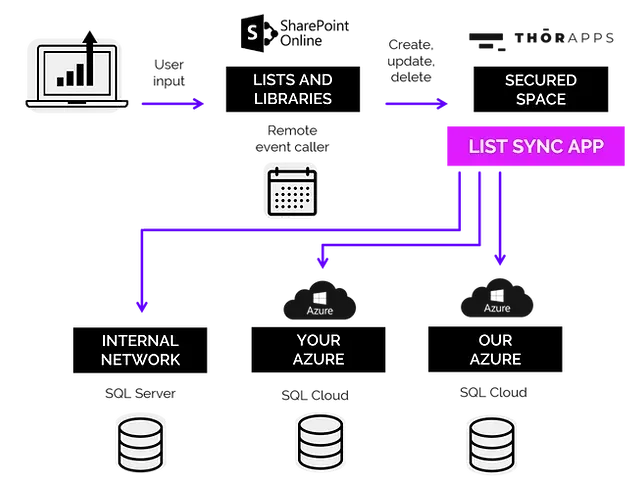
Make it easy to query data from across multiple site collections and sub-sites by collating the data into a SQL table. The data is collated at the time of data entry rather than trying to collate data from across sites at the time of report execution.
Take full control over the table and field names, but the defaults are taken from the SharePoint list field names. So you don't have to map internal names (i.e. nvarchar1, nvarchar2 etc.) to human readable field names. You can also setup default mapping rules with a single click to automate list data inclusion from new sub-sites.
By storing the data in MS-SQL (on-premise, in Azure or anywhere), you can report on the data with almost any report tool of your choice, Power BI, SSRS, ThorApps BI Service, Crystal Reports, Excel etc.).
Optimal performance
By storing your SharePoint list data in structured SQL tables you optimize querying performance. Grouping, sorting, filtering, and joining related data is as fast as it gets. List data is replicated into the SQL tables in near real-time, rather than having to wait for some background process to collect it on a schedule.
CASE STUDIES
Education
Get to know how companies from this industry are increasing their productivity with ListSync
CASE STUDIES
FINANCE
Get to know how companies from this industry are increasing their productivity with ListSync
CASE STUDIES
UTILITIES
Get to know how companies from this industry are increasing their productivity with ListSync

WHY LIST SYNC?
Forget long-term implementation and complex
billing models. We have 5 compelling reasons
why you should rely on ListSync:
1.
Get power and flexibility with customized data sets
With your SharePoint list items in SQL, you can use SQL to perform the usual joins, filters and aggregations on the server. This gives you the power to create highly customized, small data sets for use in your reporting tools that will transfer over the internet very quickly.
2.
Create as many environments as you need
ListSync allows you to create any number of separate environments. This gives you the benefit of following Dev, Test, Production release management processes but also to separate departments from each other (i.e. Sales, Operations, Admin).
3.
Access data from anywhere, anytime
When choosing for ThorApps to host your SQL database, you can fully and securely rely on a cloud service, accessible anywhere in the world, from any device.
4.
Benefit from compatibility with other apps
Storing SharePoint list items in a SQL database allows you to connect many different reporting tools (or integration tools). SQL has been around for a long time and is a supported data source almost everywhere. You are not limited to ThorApps BI Service, or Power BI.
5.
Test for free in your own environment
Trialing ListSync for free lets you ensure it meets your specific requirements, using your own data. In addition, the account management features within the app let you track your usage as you go.
HOW DOES IT WORK?
ThorApps offers its own SSRS farms, which is a secured space to store your data.
Get started today! No credit card required.
Request your
30-day trial and get
$50 credit to test List Sync App in your own SharePoint environment
>
Upon submitting this form, you will be provided with the installation instructions for our List ync App.
These instructions will lead you through adding the app to your SharePoint site and provide further links to related documentation.
